I'm not going to waste your time with generic tool lists. This is the real toolkit. These are the 19 tools I actually use every day to make money online. Some cost money. Some are free. All of them work.
I spent $15,000+ testing tools over the past 3 years. These are the ones that stuck. The ones that save time, make money, or both.
1. OpenArt - AI Image Generation (The Best)
Generate professional images for blogs, social media, products. 30-60 seconds per image. Quality is insane. Price is unbeatable.
Why I use it: Creating 100+ images/week for content. Saves $50K/year on stock photos.
Cost: Free tier (limited) or $10-20/month for unlimited
Recommendation: 10/10 - Essential tool
2. Canva - Design & Templates
Design anything. Presentations, thumbnails, social posts, graphics. Drag-and-drop simplicity. Professional results.
Why I use it: Quick design tasks without Photoshop complexity.
Cost: Free or $13/month Pro
Recommendation: 9/10 - Must-have for content creators
3. vid.ai - AI Video Generation (Faceless Channels)
Create full YouTube videos in 10 minutes. AI voiceover, visuals, editing, captions. No filming needed.
Why I use it: Generating 5+ videos/week for faceless channels. Earns $8K+/month.
Cost: $15-50/month depending on volume
Recommendation: 10/10 - Game changer for YouTube
4. CapCut - Video Editing (Free & Simple)
Free professional video editing. Desktop and mobile. Transitions, effects, captions. No learning curve.
Why I use it: Editing social media clips and YouTube shorts in minutes.
Cost: Free (premium adds watermark-free)
Recommendation: 10/10 - Best free video editor
5. ElevenLabs - AI Voiceovers (Sounds Human)
AI voices that actually sound like humans. 29+ languages. Perfect for videos, podcasts, characters.
Why I use it: Character voices for AI videos. Voiceovers for content.
Cost: Free tier (limited) or $11+/month
Recommendation: 9/10 - Essential for video creators
6. Descript - Video Editing From Transcripts
Edit videos by editing text. Automatic transcription. Remove filler words, bad takes. Game changer.
Why I use it: Cleaning up podcast recordings and video content.
Cost: Free limited or $24/month Pro
Recommendation: 9/10 - Best for removing pauses and mistakes
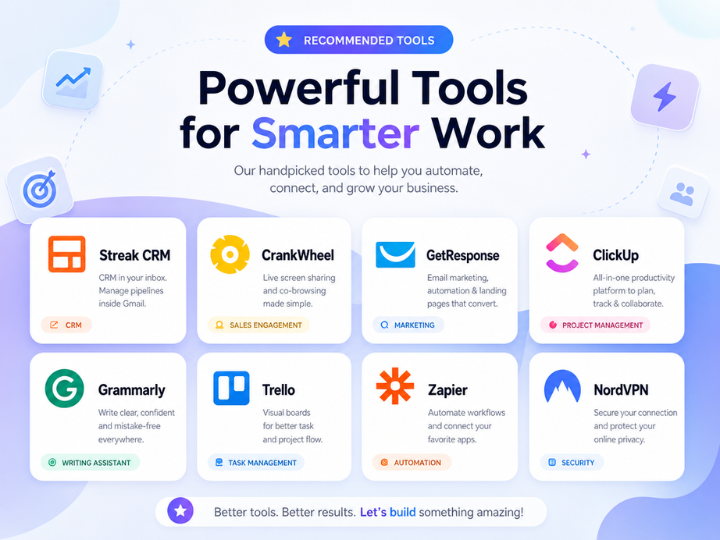
7. GetResponse - Email Marketing + Affiliate Network
Email marketing, landing pages, webinars, affiliate program. 33% recurring commission on referrals.
Why I use it: Build email list + earn affiliate commissions. One platform.
Cost: $15-99/month depending on features
Recommendation: 9/10 - Best all-in-one marketing platform
8. Streak CRM - Sales Management (Gmail Native)
CRM that lives in Gmail. Track deals, follow-ups, pipeline. 30% recurring commission on referrals.
Why I use it: Track affiliate conversions and client pipeline in Gmail.
Cost: Free or $99+/month for teams
Recommendation: 8/10 - Best if you live in Gmail
9. CrankWheel - Screen Sharing & Sales Calls
One-click screen sharing. Record calls. Demo software to customers. 30% recurring commission.
Why I use it: Screensharing for client presentations and sales demos.
Cost: $25-125/month
Recommendation: 8/10 - Essential for remote selling
10. Alidrop - Dropshipping Automation
Automate dropshipping. Auto-order placement, supplier routing, tracking. Scaled to $50K/month in 12 months.
Why I use it: Zero-effort dropshipping that actually scales.
Cost: $35/month
Recommendation: 9/10 - Best dropshipping automation tool
11. Sellfy - Digital Products Store
Sell digital products, templates, courses. One-click setup. No coding needed. 20% commission as affiliate.
Why I use it: Selling digital products and templates online.
Cost: $29-299/month
Recommendation: 8/10 - Best for digital products
12. nSave - USD Account (For Personal Transfers)
Hold USD, transfer to Pakistan/Egypt/Bangladesh/Nigeria. 1% fee vs 4% with banks. Saves $2,400/year on $60K transfers.
Why I use it: Sending money home with minimal fees.
Cost: 1.2% on transfers
Recommendation: 9/10 - Best rates for personal transfers
13. Airwallex - B2B Payments (For Businesses)
Multi-currency payments to suppliers. 0.8% fees vs 4-5% with wire transfers. Saves $18K/year on $600K payments.
Why I use it: Paying international suppliers without losing money to fees.
Cost: 0.8-1.5% on transfers
Recommendation: 10/10 - Best for business payments
14. Elevatepay - USD Payments (For Freelancers)
Receive USD payments from clients. 1.2% fees vs 2.9% with Stripe. Saves $1,020/year on $60K received.
Why I use it: Freelance payments with zero hidden fees.
Cost: 1.2% flat fee
Recommendation: 9/10 - Best alternative to Stripe/PayPal
15. Doola - LLC Formation (Easy & Fast)
Form LLC in 1 hour. Get EIN immediately. Doola handles all paperwork. $199 all-in (vs $500+ for lawyers).
Why I use it: Legitimate business structure without lawyer costs.
Cost: $199 one-time (10% off with code startupleafy)
Recommendation: 10/10 - Best for quick LLC formation
16. Clemta - Tax Preparation (Professional + Affordable)
Professional tax prep for freelancers. $399/year (vs $2,000+ for CPAs). Files everything. No stress.
Why I use it: Professional taxes without CPA costs.
Cost: $399/year (10% off with code startupleafy)
Recommendation: 9/10 - Best for affordable tax prep
17. Pinterest - Traffic Engine (The Secret Weapon)
450M users actively searching for solutions. Drive traffic to your site, affiliate links, products. Unlimited free pins.
Why I use it: Makes $6,160/month from 6 income streams on Pinterest alone.
Cost: Free (Creator Fund pays you for views)
Recommendation: 10/10 - Best platform for monetization
18. Alohi - Content Ideas & Inspiration
AI-powered content ideas based on trends. Never run out of things to create. Smart inspiration engine.
Why I use it: Beating creator's block with data-driven content ideas.
Cost: Free tier or $20-99/month
Recommendation: 8/10 - Great for content planning
19. Lindy AI - Automation & Integration
Automate repetitive tasks. Connect apps, trigger workflows, save 10+ hours/week. 25% recurring commission.
Why I use it: Automating routine business tasks (posting, sending emails, organizing files).
Cost: Free or $99+/month
Recommendation: 8/10 - Essential for automation
My Daily Money-Making Stack:
1. Generate ideas with Alohi
2. Create visuals with OpenArt
3. Design posts with Canva
4. Create videos with vid.ai + ElevenLabs
5. Edit with CapCut + Descript
6. Share on Pinterest (with affiliate links)
7. Build email with GetResponse
8. Manage sales pipeline with Streak
9. Schedule demos with CrankWheel
10. Automate tasks with Lindy
11. Receive payments with Elevatepay
12. Transfer internationally with Airwallex
13. Handle taxes with Clemta
This stack generates $8K-50K/month depending on focus.
OpenArt: $15
Canva: $13
vid.ai: $30
ElevenLabs: $11
GetResponse: $25
Streak: Free tier
CrankWheel: $35
Sellfy: $29
Doola: ($199 one-time)
Clemta: ($399 annual)
Pinterest: Free
Alohi: $20
Lindy: $99
Total: ~$315/month
This toolkit generates $8K-50K/month. ROI: 25x to 160x
Knowing which tools to use is one thing. Knowing how to combine them into a money-making system is another. Learn the complete framework on Startuplexa. Go from scattered tools to systematic income.




This really encouraged me today, thank you for sharing!
Beautifully written. Sharing this with my family.
Exactly what I needed to read right now. Bless you for this.